Open-source project

Music Improvisation Study Tool
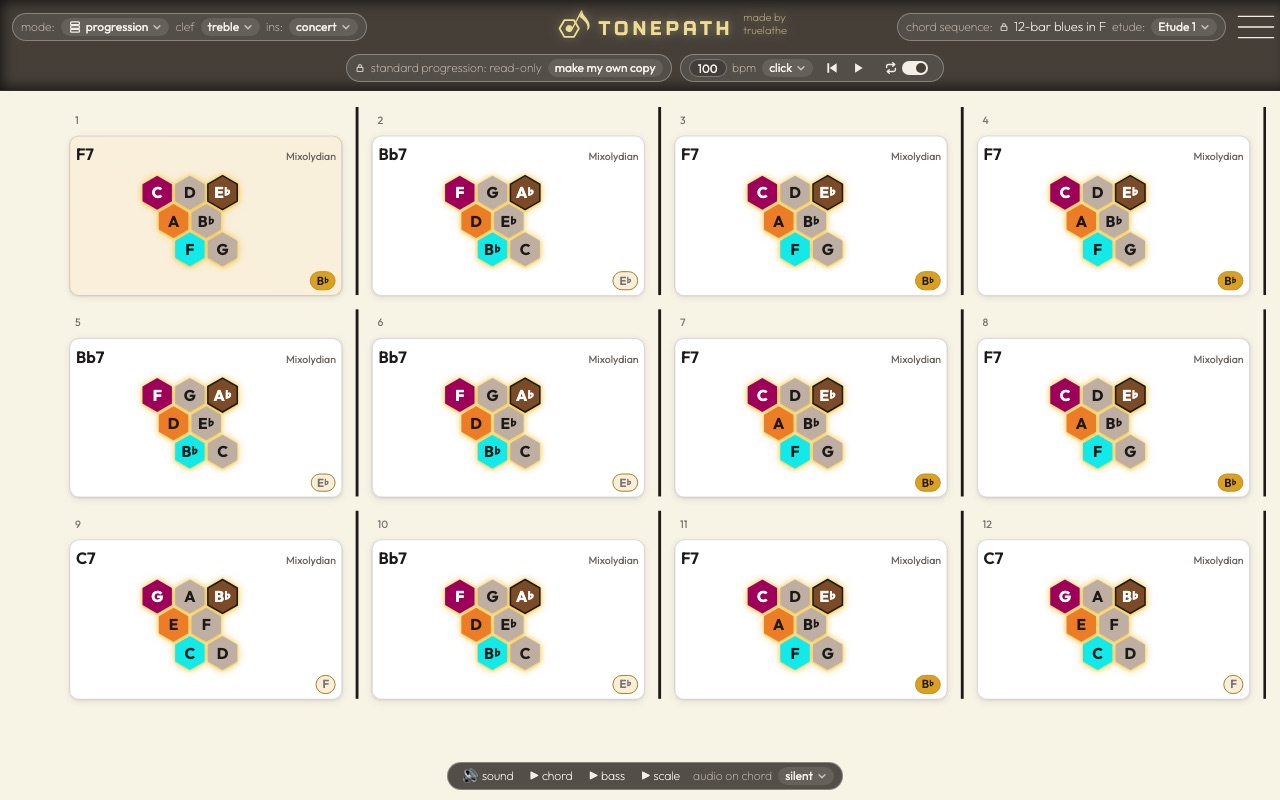
About Tonepath
The problem
Improvising over chord changes means knowing, at every bar, which notes belong to the chord and its scale, and how to move between them. Most practice tools show a keyboard or a fretboard, which hide the patterns those notes make.
What I built
I got inspired to build this project after watching a yotube video by Fons The Improviser. He was talking about improvising as a path we create across chords, using various scales or chord tones. It made me try to think of a useful way to represent the decision we make every time we go to a note when we improvise, or when we create a melody.
I began thinking about hexagonal midi controllers like the hex board, and decided to see what I could do with a hex grid input in the app. The idea was that we can then view note choices less linearly and in a pattern like way. I then realized that this was a learning path that was almost an instrument on it's own, and that musicians should have a way to then bring that to their main instrument.
So that's how I ended up with the concept of an app that was essentially a way for the musician to to compose their own exercises or etudes, and then play them on their instrument by reading the notation, accompanied by the chords and a metronome.
How it works
It takes a musician from a chord chart to playing over it, in modes:
Edit progression: enter the chords, pick their scales, and play the progression back.
Edit etude: write a line over the chords by picking notes on the hex.
Improvise on the grid: play on the hex while the transport moves through the chords.
Tune instrument: the hex lights every note played into the microphone.
Improvise on instrument: play over the changes with a click, the hex following each chord as it comes.
Read etude: every bar on one page, with a click and a moving playhead.
Where it is now
Free to use at tonepath.truelathe.com, with its code on GitHub.
Built with
Open source
Tonepath is open source, under the MIT license: read how it's built, run it, or build on it, on GitHub.
What's on the site
- Edit progression: enter the chords and pick their scales, with the whole screen for the chart. ▶ plays the progression back.
- Edit etude: write a line over the chords by picking notes on the hex, a honeycomb of each chord's scale with a step to the right and a third up-left.
- Improvise on the grid: play on the hex while the transport moves the chords, or let chord bump move on after a set number of notes.
- Tune instrument: warm up and tune. The hex lights every note played into the microphone.
- Improvise on instrument: play over the changes with a click and the chords, the hex following each chord as it comes.
- Read etude on instrument: every bar on one page, with a click and a moving playhead.